↑
SharePoint intranet templates and form builder · 2026 collection

The intranet, edited.

Eight finished SharePoint templates, 31 web parts, a form builder with approvals and a helpdesk, designed by Cloudly Move. Install in an afternoon. Look like you hired an agency.

Live web parts, sample data
Intranet

Templates & web parts

Eight finished intranet sites and 31 web parts. A finished page in one step.

From £1,200See the templates →
New · Form Builder & Approvals

Build a form. Route the approvals.

Purchase requests, leave, IT access and a ready-made gifts and hospitality register, with approvals, emails and a full audit trail.

£1,495Watch the 2-minute film →
New · Zip & Unzip

Open a zip in SharePoint.

Extract and create zip files in any library, with a safe preview, undo and your choice of name.

£795Try it live →
New · Learn

An LMS in SharePoint.

Courses, quizzes, learning paths and certificates, with a compliance view of who is up to date.

£2,495Try it live →
New · Document Manager

Controlled documents, without the chasing.

Numbers, approvals, review dates and proof of reading for every policy and procedure. It reads each file to fill in the details.

£2,995Try it live →
New · Helpdesk

A service desk on every page.

Tickets for IT, HR and Facilities, known issues and plain-English promises, with a Get help button across your intranet.

£1,495Watch the 3-minute film →
The collection

Eight templates. No blank pages.

Each one is its own SharePoint package, with artwork and starter content, and builds a finished page in one step. Press play to watch one assemble itself.

Scroll inside the page to see it all
01

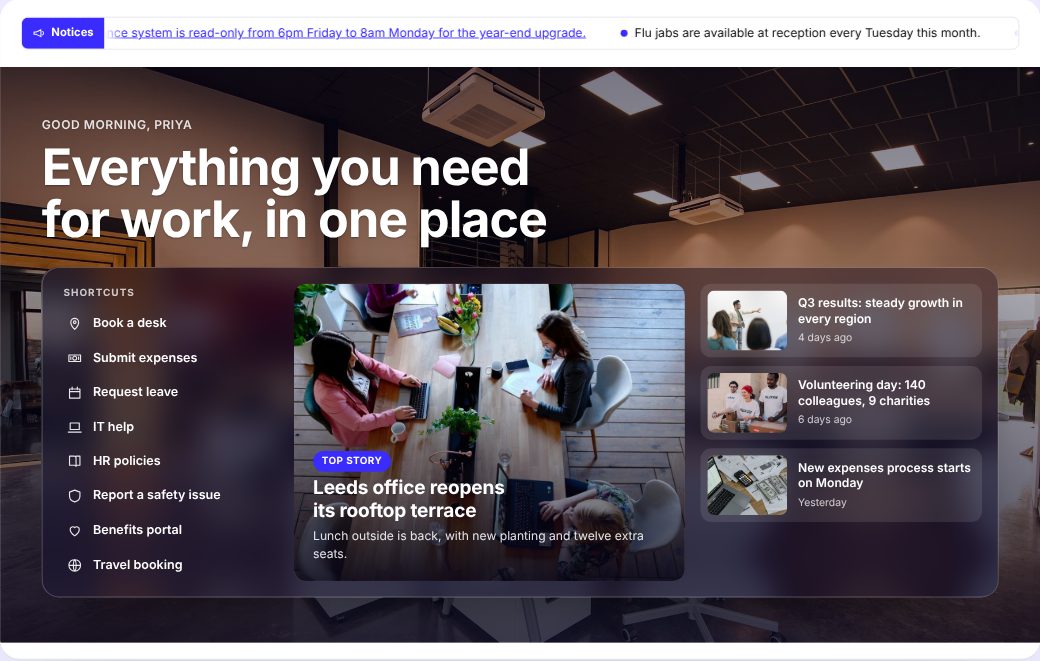
Company Home

The front door for every employee

Opens like a website: a greeting by first name with shortcuts and the top stories on one photo, the company’s numbers as bold tiles, must-reads, a calendar of what’s on, celebrations and thank-yous. The page your intranet opens on.

  • Alerts and Ticker
  • Welcome Banner
  • Key Figures
  • Targeted News
  • Events
  • Celebrations
  • Poll
  • Shoutouts
  • Spotlight
  • Its own SharePoint package (.sppkg)
  • Banner artwork and starter content included
  • One-click setup bar for site owners
£1,200+ VAT · one tenant · any 3 templates for £2,950
Template details

SharePoint Online · no API permissions

Scroll inside the page to see it all
02

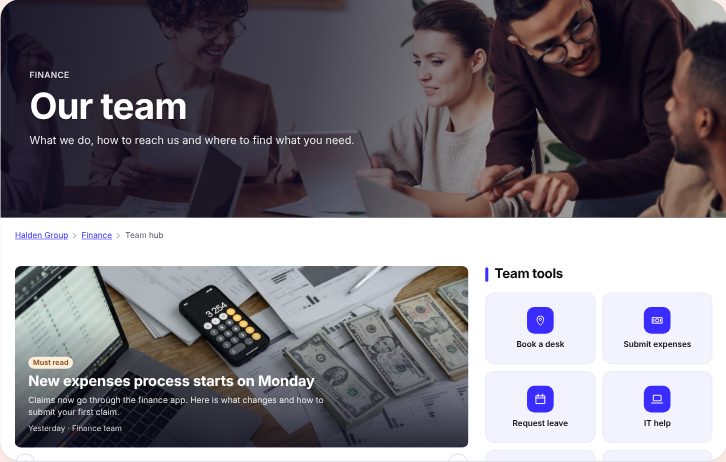
Team Hub

One home per department

What the team does, its news and tools, who’s who in an org chart, and answers to the questions it gets every week. Copy it for Finance, IT, Marketing and every team after.

  • Welcome Banner
  • Breadcrumb
  • News Carousel
  • Content Tabs
  • Spotlight
  • App Launcher
  • Org Chart
  • FAQs
  • Glossary
  • Its own SharePoint package (.sppkg)
  • Banner artwork and starter content included
  • One-click setup bar for site owners
£1,200+ VAT · one tenant · any 3 templates for £2,950
Template details

SharePoint Online · no API permissions

Scroll inside the page to see it all
03

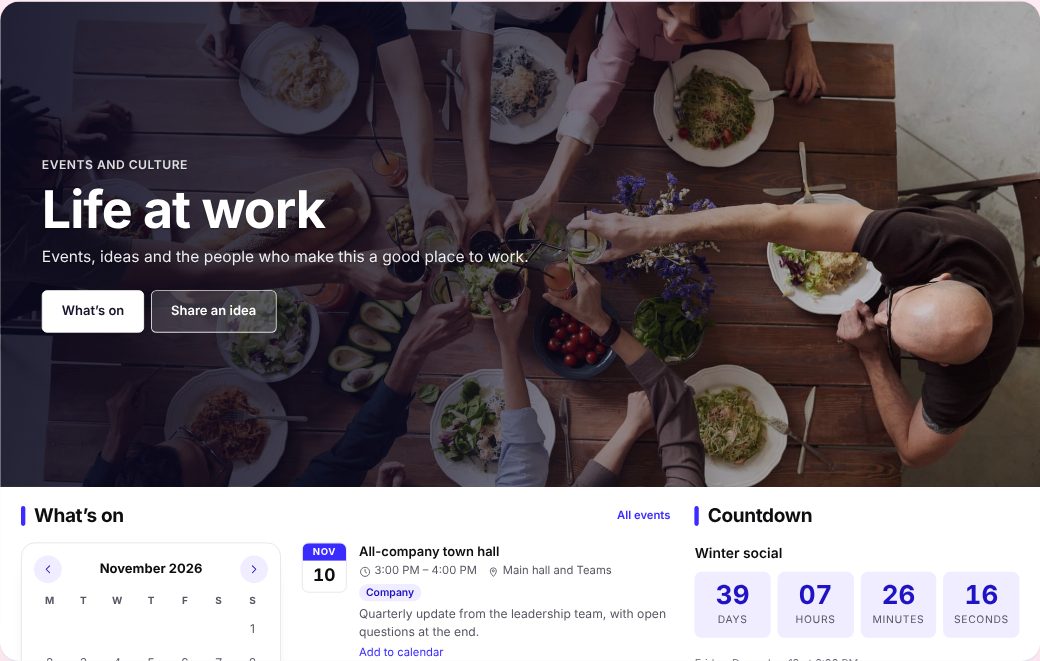
Events & Culture

Where the company comes together

A countdown to the next big moment, what’s on, a daily pulse, a wall of thank-yous and an ideas box. Built for the social committee and the people team.

  • Welcome Banner
  • Events
  • Countdown
  • Pulse
  • Spotlight
  • Shoutouts
  • Ideas Box
  • Its own SharePoint package (.sppkg)
  • Banner artwork and starter content included
  • One-click setup bar for site owners
£1,200+ VAT · one tenant · any 3 templates for £2,950
Template details

SharePoint Online · no API permissions

Scroll inside the page to see it all
04

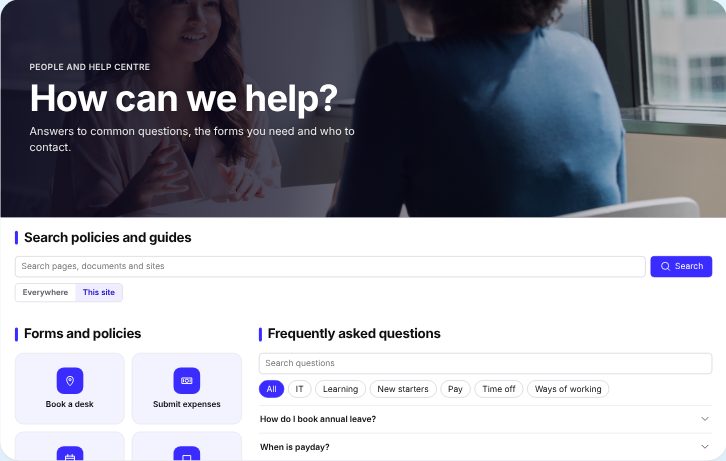
People & Help Centre

Answers before tickets

Search, FAQs, forms and policies, internal vacancies, offices and who to contact. HR and IT answered in one place, before anyone raises a ticket.

  • Welcome Banner
  • Search
  • App Launcher
  • FAQs
  • My Profile
  • Internal Jobs
  • Offices
  • Employee Directory
  • Its own SharePoint package (.sppkg)
  • Banner artwork and starter content included
  • One-click setup bar for site owners
£1,200+ VAT · one tenant · any 3 templates for £2,950
Template details

SharePoint Online · no API permissions

Scroll inside the page to see it all
05

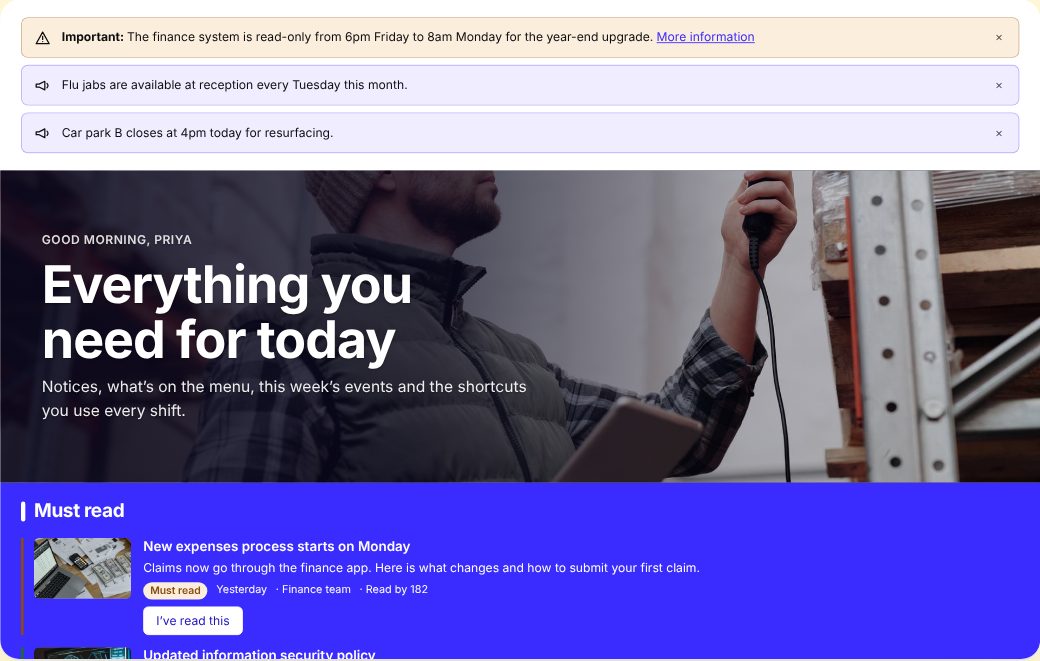
Location Home

For frontline and site teams

Notices and must-reads first, today’s menu, this week’s events, shortcuts and the time across your sites. Designed for a phone between shifts.

  • Alerts and Ticker
  • Welcome Banner
  • Targeted News
  • Canteen Menu
  • Events
  • App Launcher
  • World Clock
  • Its own SharePoint package (.sppkg)
  • Banner artwork and starter content included
  • One-click setup bar for site owners
£1,200+ VAT · one tenant · any 3 templates for £2,950
Template details

SharePoint Online · no API permissions

Scroll inside the page to see it all
06

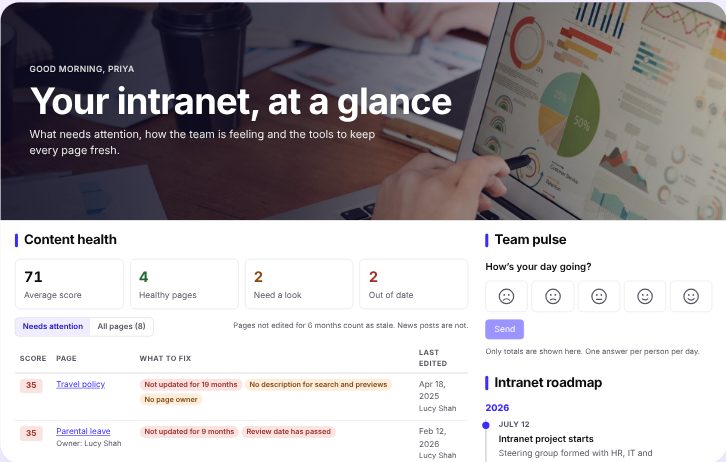
Owner Dashboard

For the people who run the intranet

Every page scored for freshness and ownership, the team’s pulse, a roadmap and one-click setup. Keep it unlisted and check it every Monday.

  • Welcome Banner
  • Content Health
  • Pulse
  • Timeline
  • Its own SharePoint package (.sppkg)
  • Banner artwork and starter content included
  • One-click setup bar for site owners
£1,200+ VAT · one tenant · any 3 templates for £2,950
Template details

SharePoint Online · no API permissions

Scroll inside the page to see it all
07

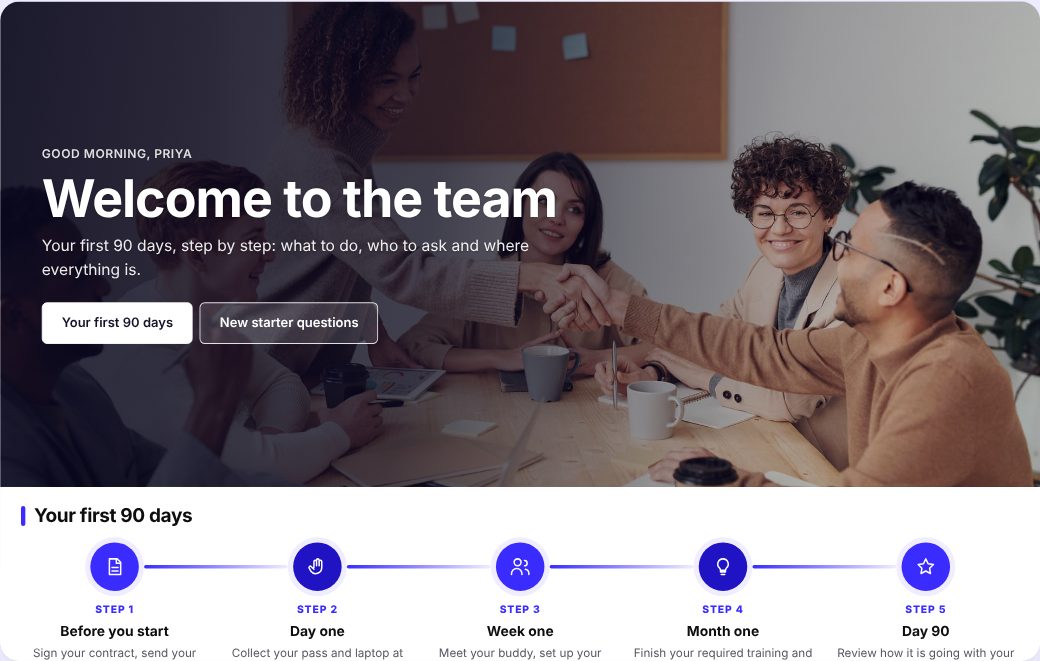
Onboarding

For every new starter

The first 90 days as five clear steps, the first week day by day, new starter essentials as tiles, must-reads and the questions every new starter asks. Ready before their first morning.

  • Welcome Banner
  • Timeline
  • Accordion
  • App Launcher
  • Targeted News
  • Celebrations
  • FAQs
  • Events
  • Its own SharePoint package (.sppkg)
  • Banner artwork and starter content included
  • One-click setup bar for site owners
£1,200+ VAT · one tenant · any 3 templates for £2,950
Template details

SharePoint Online · no API permissions

Scroll inside the page to see it all
08

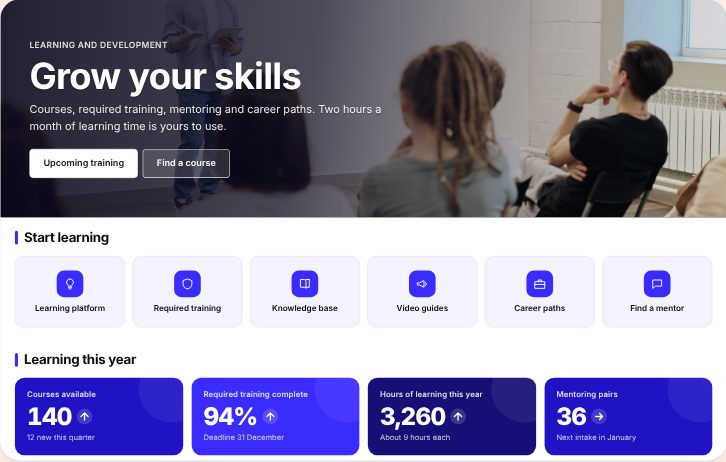
Learning Hub

Where people grow

Learning tools as tiles, progress in numbers, a calendar of courses, required training with deadlines and a course finder. One place for L&D, compliance and careers.

  • Welcome Banner
  • App Launcher
  • Key Figures
  • Events
  • Targeted News
  • Content Tabs
  • Spotlight
  • FAQs
  • Its own SharePoint package (.sppkg)
  • Banner artwork and starter content included
  • One-click setup bar for site owners
£1,200+ VAT · one tenant · any 3 templates for £2,950
Template details

SharePoint Online · no API permissions

New · Atrium Form Builder & Approvals

A form builder with approvals, inside SharePoint.

Gifts and hospitality declarations, purchase requests, leave, system access: build the form, choose who approves, publish. Requests, tasks and the full history stay in lists on your own site.

Two minutes, filmed in SharePoint Online: install, design, submit, approve, gifts and hospitality, and storage.

Loading the live demo…

Running live with sample data. Approve a request, make one, or open Processes to edit a form.
Ready to use

Gifts and hospitality register

A declaration form built around UK anti-bribery practice. Staff declare what they’re offered or give, accepted or declined. Your manager approves £25 or more; Compliance approves anything over £75, during a tender, to or from a public official, cash, travel, or repeat offers. Every declaration lands in one register you can filter and export.

Why it matters: the Bribery Act 2010, MoJ guidance, the Procurement Act 2023 and public-sector policies →

  • Drag-and-drop form designer. Eleven field types, defaults from each person’s profile, and rules that show or require fields only when they matter.
  • Approvals that route themselves. The requester’s manager from Microsoft 365, a named person, or someone chosen on the form. Add stages that only run over £5,000, or for admin access.
  • My requests and To approve. Everyone sees where their request has got to. Approvers decide with a comment, or hand it on.
  • A full audit trail. Every submission and decision is recorded, with attachments on the request and a CSV export for owners.
  • Emails that arrive. Approvers get an email when a request needs them, requesters when it’s decided, sent through Microsoft 365. An admin approves one permission once.
  • No premium licences. No Power Apps Premium, no servers to run, and your data stays in your tenant.
£1,495+ VAT

One payment per tenant. Unlimited forms, users and requests.

New · Atrium Helpdesk

A service desk people actually use.

Tickets for IT, HR and Facilities, with help one click away on every page of your intranet. Everything stays in lists on your own site, and one price covers every agent.

Three minutes: the Get help button, known issues, the promise, approvals, the queue and the dashboard.

Loading the live demo…

Running live with sample data. Open a ticket, reply, add a note, or declare a known issue.
What others don’t do

Help on every page

A Get help button sits on every page of the site, for everyone. It answers from your own FAQ and glossary, shows what’s already broken, and raises a ticket that already knows which page the person was on.

  • Known issues. Post one update when something is down. Everyone affected is told, an alert shows on the intranet, and resolving it closes every linked ticket.
  • The promise. Each requester sees a plain-English answer on when they’ll hear back, and you see how often you kept it.
  • Approvals built in. Link a category to a Form Builder & Approvals process. The ticket waits for sign-off and the clock starts on approval.
  • Working-hours SLAs, attachments, canned replies. Round-robin assignment, internal notes, auto-close and CSV export.
  • Private by design. Requesters see only their own tickets, and internal notes live in a separate agents-only list.
  • No per-agent fees. No servers to run, no Azure, and your data stays in your tenant. Email through Microsoft 365 is optional.
£1,495+ VAT

One payment per tenant. Unlimited agents, users and tickets.

New · Atrium Learn

An LMS that lives in SharePoint.

Courses, quizzes, learning paths and certificates, with a compliance view that shows who is up to date. No second login, no per-learner fees.

Two minutes: the learning home, a course and its quiz, certificates, building and assigning training, compliance and reminders.

Loading the live demo…

Running live in your browser with invented people. Try a course and its quiz.
  • A whole learning site. A home page that greets each person with what’s due, their progress, sessions to book and courses to explore, plus a Learn menu and starter courses.
  • Build courses. Pages, videos, documents, links and classroom sessions in a set order.
  • Quizzes that mean something. A pass mark, a limit on attempts and four question types.
  • Learning paths. Group courses into a programme, such as new starter essentials.
  • Classroom sessions. Dates, places, a waiting list that fills itself, and a register that completes the step.
  • Due dates and renewals. Repeat training every few months. Each cycle starts fresh.
  • Reminder emails. On assignment, and a daily nudge to everyone overdue or due this week, automatic or with one click.
  • For line managers. A My team view of each direct report’s training, with a reminder button.
  • Certificates. Numbered, with an expiry date when the training has to be renewed.
  • Compliance view. See who is up to date and who is overdue, and download it for auditors.
  • Your permissions apply. Everything runs as the signed-in person. Nothing leaves your tenant.
  • xAPI and Teams. Export every result as xAPI statements, and add Learn as a Microsoft Teams tab.
  • Coming soon. SCORM packages and Viva Connections.
£2,495+ VAT

One payment per tenant. Unlimited learners and courses. No subscription.

New · Atrium Document Manager · AI built in

Controlled documents, without the chasing.

Every policy and procedure numbered, approved, reviewed on time and provably read, in the SharePoint you already have. AI is built in and needs no Copilot licence: it reads each file to fill in the details for you.

Two minutes: the built-in AI that needs no Copilot licence, the home page, approvals, read and confirm, reviews, the audit trail and settings. Recorded in the demo with sample data.

Loading the live demo…

Running live in your browser with invented people. Approve the expenses policy, or ask for “overdue policies”.
  • AI fills in the form for you. Upload a Word, PowerPoint or Excel file and it suggests the title, type, department, tags and a summary, in your browser. The file isn’t sent to any AI service.
  • AI search in plain English. “Overdue HR policies”, “procedures approved this year”, “what do I need to read?”
  • No Copilot licence needed. The AI runs in the browser for every user. It suggests and searches; it is not a chat assistant.
  • Numbers that never clash. QMS-SOP-0042, in your own format, given the moment a document is saved.
  • Staged approvals. Approvers sign in order. Sent back needs a reason. Every decision is kept.
  • Readers only see what’s approved. Drafts are minor versions; approval publishes the next major version.
  • Reviews on time. Due-soon and overdue lists, one click to confirm, reminder emails.
  • Read and acknowledge. Who has confirmed each version, and who hasn’t.
  • Governed templates. New documents start from the approved Word template for their type.
  • Audit trail. Who did what and when, for every document, downloadable for your auditor.
  • Your permissions apply. Everything runs as the signed-in person. No AI key, no servers to run, and your documents stay in your tenant.
£2,995+ VAT

Initial offer. One payment per tenant. Unlimited users and documents. No subscription.

New · Atrium Zip & Unzip

Open a zip in SharePoint. Finally.

SharePoint can only zip on download, with a name you don’t choose, and it can’t extract at all. Atrium adds Extract and Zip to every document library, with a safe preview first.

Under three minutes: the problem, the security risks, a real walkthrough on SharePoint Online, and the honest limits.

Loading the live demo…

Running live in your browser. Nothing is uploaded.
  • Extract anywhere. Into this folder, a chosen folder, or a new folder named after the archive, keeping the structure.
  • Preview first. See what’s inside, untick what you don’t want, and spot risky files before anything is written.
  • Safe by default. Path tricks and zip bombs are stopped, and your admin sets the blocked and allowed file types.
  • Zip your way. Choose the name, save it in the library or download it, add an AES password, or send an expiring link.
  • Big archives. Chunked uploads, a result report, and one bad file never stops the rest.
  • Undo. Remove everything an extraction created in one click, with the recycle bin as a safety net.
  • Tag and automate. Tag extracted files, set auto-unzip rules per library, and keep an audit log.
  • Garbled names fixed. Archives from other languages and systems open with the right file names.
  • Your permissions apply. Everything runs as the signed-in person. No servers to run, no Azure, and your data stays in your tenant.
£795+ VAT

One payment per tenant. Unlimited users, libraries and archives. No subscription.

The index

Every web part, one at a time.

Pick any web part to try it, running live. Add the ones you want to your order and we’ll package them together.

Pricing

Buy once. Keep it.

One payment per Microsoft 365 tenant, no subscription. Prices exclude VAT. Pay by bank transfer or purchase order, and your download arrives within 2 working hours of payment.

One template
£1,200+ VAT

Its page, artwork, starter content and every web part it uses.

Any three templates
£2,950+ VAT

Then £600 for each one after. All 8: £5,950.

One web part
£95+ VAT

Any single web part, with its lists set up for you.

Every web part
£1,950+ VAT

All 31 web parts to build your own pages. Template pages not included.

Form Builder & Approvals
£1,495+ VAT

Request forms and approvals, with a ready-made gifts and hospitality register. Unlimited forms, users and requests.

Learn (LMS)
£2,495+ VAT

A learning management system: courses, quizzes, paths, recurring training, certificates and a compliance view. Unlimited learners and courses.

Document Manager
£2,995+ VAT

Initial offer. Controlled documents: numbering, templates, staged approvals, review dates, read-and-acknowledge and an audit trail. Unlimited users and documents.

Zip & Unzip
£795+ VAT

Extract and create zip files in any library, with a safe preview and undo. Unlimited users and libraries.

Helpdesk
£1,495+ VAT

A service desk with help on every page, known issues and plain-English promises. Unlimited agents, users and tickets.

How it works

From order to live page.

No Azure and no app registration. Your content stays in SharePoint lists on your own site.

01

Order

Choose templates and web parts and add your billing details. We email your invoice, normally within one working day.

02

Pay and receive

Pay by bank transfer or purchase order. Within 2 working hours of payment, a download link for your own .sppkg arrives with a setup guide.

03

Publish

Upload it to your app catalog and add it to a site. The setup bar builds the lists, artwork and page for you. Read the setup guide.

Security

Built to pass review.

Written for the IT, security and compliance people who sign off what goes on your tenant.

Your tenant only

Content lives in SharePoint lists on your sites. Nothing is sent to Cloudly Move.

No consent screens

The intranet packages ask for no Microsoft Graph or API permissions. Form Builder & Approvals asks for one, optional: Mail.Send, so it can email approvers.

Standard deployment

Uploaded through your app catalog like any SPFx solution, then added only to the sites you choose.

Side by side

Every package has its own IDs, so several templates install together without clashing, and upgrades replace in place.

Questions

Good to know.

How do I buy?

Add templates and web parts to your order and send it with your billing details. We email an invoice, normally within one working day. Pay by bank transfer using the invoice number as the reference.

When do I get the download?

Within 2 working hours of your payment reaching us (Monday to Friday, 9am to 5pm UK time). Most links go out as soon as the payment is matched.

Can we pay by purchase order or another way?

Yes. Choose “Purchase order or other” when you order and add your PO number. The invoice shows it, and the download follows once payment arrives.

What does the licence cover?

One Microsoft 365 tenant, as many sites and users as you like, forever, with 12 months of bug-fix updates and email support. Prices exclude VAT, which is added at 20%. The full terms of sale are at atrium.cloudlymove.com/terms.

What happens after I install it?

Upload the package to your app catalog and add it to a site. Site owners then see a setup bar that creates the lists, adds the template artwork and starter content, and builds the page in one step.

What is Atrium Form Builder & Approvals?

Request forms and approvals inside SharePoint, sold separately for £1,495 + VAT. Site owners build forms and approval stages; people submit requests and follow them; approvers get an email and decide in one place. It needs no Power Apps Premium licence and runs entirely in your SharePoint.

Can it run our gifts and hospitality register?

Yes. It comes with ready-made gifts and hospitality processes for companies and for public bodies, built around the Bribery Act 2010, the Ministry of Justice guidance on adequate procedures and published public-sector policies. Staff declare what they are offered or give, accepted or declined; managers and Compliance approve by your limits; and owners export the register as CSV.

Who can see requests?

Requests are stored in lists on the site where you install it, so anyone who can read that site can open them. For sensitive processes, use a site whose members are just the people involved. The lists are kept out of search results, and only site owners see All requests and the designer.

Where is our data kept?

In your own Microsoft 365 tenant, in SharePoint lists on your sites. Your content is never sent to us: Atrium has no database of your data and no licence check calling home. Standard packages run entirely from your app catalog. Guest-ready packages load their script files (code only, never your content) from atrium.cloudlymove.com, so guests can use them.

What permissions does it ask for?

The intranet templates and web parts ask for none beyond SharePoint itself. Form Builder & Approvals asks for one optional permission, Microsoft Graph Mail.Send, so it can email approvers and requesters from the person acting. An admin approves it once in the SharePoint admin centre; without it, everything else still works.

Does it work on phones and in Teams?

Yes. Every web part works in narrow columns and on phone screens. Any Atrium page can be added to a Teams channel as a tab, and once your admin syncs the package to Teams, each web part can be a tab of its own. Employee Directory, Org Chart and My Profile can also be pinned to the Teams left-hand bar as personal apps.
Cloudly Move · London

Let’s make your intranet worth opening.

Want it branded, set up and launched for you? Our Microsoft 365 consultants can have Atrium live on your tenant in days.

Book a callinfo@cloudlymove.com