Atrium AI: the self-managing intranet, built for Copilot
Every intranet starts accurate and then goes stale, and Copilot repeats whatever it finds. Atrium AI is a SharePoint intranet that keeps its own pages accurate after launch: every page has an owner and a review date, the intranet chases the review for you, and a page nobody answers for is handed on, then moved out of the way.
Built for Microsoft 365 Copilot. Copilot is only as good as the pages it reads. Atrium AI keeps those pages reviewed, with one source of truth per topic.

Who it is for
An organisation of about 500 to 5,000 staff that already uses Microsoft 365 Copilot, where the intranet has gone out of date and Copilot is repeating old policy. It is usually bought by whoever owns the intranet: internal communications, HR or IT.
Who uses it, and what each person does
See who owns each page and when it was last checked. Nothing else to do.
Get a card in Teams when a review is due. One click confirms the page.
Sees what is current, due and overdue on one dashboard, and keeps the golden questions.
Installs it once and approves the permissions. No server to run.
How it gets onto your intranet
We do thisYou do this
- We send the packageMade for your Microsoft 365 tenant.
- Your admin adds itTo your app catalog, then presses Deploy.
- Setup runsIt creates the lists and page details, and the banner appears.
- Import the Teams flowInto Power Automate, so owners get their cards.
- Give pages an ownerAnd a review period. New pages cannot be published without them.
- Add golden questionsAtrium AI starts checking them.
Everything runs inside your own SharePoint, as the person who is signed in. Nothing is hosted by us.
What it does today

Every page says who owns it
A banner shows the owner, the backup and when the page was last checked. When a review is due, the owner confirms it with one click.

One dashboard for the whole intranet
What is current, what is due, what is overdue and what is waiting on someone.

It hands the page on by itself
No answer for three weeks, so the page passed to its backup owner. No administrator was involved.

Golden questions catch a wrong answer
List the questions staff really ask. After every change, Atrium AI checks the answer is still on the page and that Copilot still returns that page.
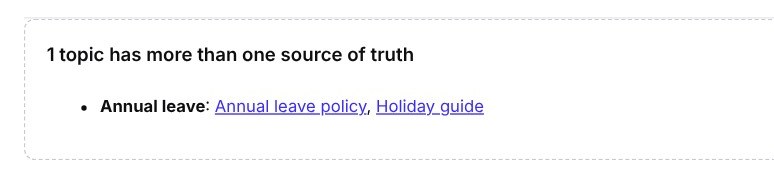
One source of truth per topic
When a second page claims a topic, Atrium AI spots it, settles it and tells both owners.
It chases, so nobody has to remember
Also included
- Confirm from Teams. Owners get a card with a Confirm button, so they never need to open the intranet
- Nothing published without an owner. Owner, backup owner, review period and topic are required. A new page without them goes back to draft
- Leavers are spotted. When an owner is no longer in the directory, the backup is asked to take the page or name someone new
- Held pages come back with one button, and a notice is left at the old address
- Six page layouts built for Copilot: policy, how-to, department, service, news and FAQ, each with the same headings every time
At a glance
- What it is
- Its own product: a way of running an intranet, not a page template
- How it is delivered
- In four stages. Each has a test it must pass before the next begins
- Who it suits
- 500 to 5,000 staff, already using Microsoft 365 Copilot
- Price
- Priced by stage. Contact us for a price
- Needs
- Microsoft 365 Copilot, Power Automate for the Teams cards, and a SharePoint administrator for setup
- Where it runs
- In your own Microsoft 365 tenant, on SharePoint lists and pages you can see
Why this matters for Copilot
Microsoft 365 Copilot answers from your content. If two pages disagree about annual leave, or the expenses policy was last touched three years ago, Copilot can still quote them with confidence. Atrium AI works on the content, so the answers improve without anyone tuning prompts:
- Reviewed pages. Every page has a named owner and a date it was last confirmed
- One answer per topic. No competing versions for Copilot to choose between
- Stale pages out of the way. Pages on hold sit in a separate site that is set up to be left out of Copilot and search
- The same shape every time. Fixed headings on every policy, guide and FAQ, so the answer is where Copilot expects it
Why other intranet products don’t do this
Most intranet products help you launch: templates, web parts, a theme. What happens in month six is left to a content calendar and good intentions. Atrium AI is built for month six. It never publishes, retires or deletes on its own; it asks a named person, and acts on the rules you agreed when nobody answers.
Four stages, each with a gate
Atrium AI is its own product, not a set of page templates, so it is delivered in stages. Each stage ends with a test you can watch it pass. You decide at each gate whether to go on.
Three of four stages are available now.
Sites, trust details on every page, the trust banner and six page layouts.
Gate: a page cannot be published without an owner and a review period.
The daily check, chasing, handover to the backup owner, the Holding site, Teams cards and the dashboard.
Gate: an overdue page is handed on and moved to Holding with no administrator involved.
A fixed list of real staff questions, checked on the page and through Copilot after every change, with failures sent to the page owner.
Gate: a deliberately wrong edit to a policy page fails a test within one hour. On our tenant it took eight seconds.
Agents that draft the fix for an out-of-date page, and an intranet structure proposed from your org chart, existing sites and failed searches.
Gate: from scan to an approved draft intranet in one working day.
Stage 4 is not built yet. We will say when it passes its own gate on our tenant.
What should we know before we talk?
- It needs Microsoft 365 Copilot. There is no mode for organisations without it
- On an intranet you already have: your published pages stay published, and each one appears on the dashboard until it is given an owner. They show the trust banner without being edited, and the dashboard lets you give many pages an owner in one go. Readers see the banner on a page once it has an owner. We tested this on a small stand-in site on our own tenant, not on a customer’s intranet
- The daily check runs when someone with edit rights opens a page of the site. A scheduled run for quiet sites is being built
- The Teams cards run on Power Automate, under an account you choose when you install them
- Hiding the Holding site from Copilot uses Microsoft’s Restricted Content Discovery setting, which needs the right Microsoft licences. We check this with you first
- Golden questions are checked when someone with edit rights views the page, which is normally the person who just changed it. They test what Copilot’s retrieval returns, not the wording of Copilot’s reply
- Stages 1 to 3 have been tested on our own Microsoft 365 tenant. They have not yet been installed for a customer
Priced by stage
The price depends on the size of your organisation and how many stages you take. Tell us about your intranet and we will send a price for each stage.
Want it set up for you?
Our Microsoft 365 consultants can brand, install and launch Atrium on your tenant in days. Or buy the packages and do it yourself in an afternoon: templates from £1,200, web parts from £95, plus VAT.